Loop engineering convinced me. Not because it’s clever — because done right, it doesn’t bankrupt you. This post captures where I’ve landed: a responsible way to run loops at scale without burning a hole in your pocket.
Naysayer → Believer ##
I’ve been a vocal naysayer. Not because the approach doesn’t work — it works. The costs never justified it. No surprise — the people singing its praises usually aren’t the ones paying the API bills.
But when Peter & Boris tell you something, you look closer. Same thing happened with agent skills — Simon W saw something early, and that became the biggest hammer in our AI toolbox.
Types of loops ##
The public discourse mixes loops with loop “engineering,” so let’s disambiguate.
One-shot loops ###
Today, an agent can execute a task, have an independent judge review the result1, apply the feedback, and repeat. You put a cap on the number of loops. Or you let it run until it’s “satisfied” — a bad idea.
These are easy to set up. Many people are already demonstrating them. I call these one-shot loops. They’re easy enough that I’ll focus on the other kind.
Autonomous loops ###
But when Peter Steinberger and Boris Cherny talk about loops, I think they mean autonomous loops.
You set up agents to run continuously. They decide when to act, pick up the right tasks, spin off subagents, research, test theories, and send results back for review. Or ship, if confidence is high enough.
An entire system running on its own — you shovel tasks at the speed of thought or voice. These loops are self-sustaining and take real engineering to get right.
I’ll go out on a limb:
Most of the software engineers of tomorrow are going to be spending their time setting up and engineering loops. Because it’s hard and it’s going to require skill — there’s no one loop we can template for all solutions.
From my experimenting so far, this feels bespoke in the way good software is bespoke. You can’t just use an agent skill or whip up a template. Each loop needs tweaking, integrations with specific tools, and a different approach to execution and queueing.
Good use cases for a loop ##
The easiest way to understand loop engineering is to look at concrete use cases:
Sequencing and coordinating tasks ###
I’ve been building a custom font on the side. While working on it, I’d get ideas and want to queue them up. Some tasks I could spin off in parallel. Others needed a prerequisite to finish first. Ideas struck at random moments — usually when I was nowhere near the repo.
Wouldn’t it be nice if I could pull up my phone, speak to an AI agent and explain the task, and the agent would add it to the queue and sequence it correctly based on the ongoing work?
Loops supercharge this kind of workflow where you no longer need to maintain a todo list. You can speak your ideas into a phone, and trust that it’s captured correctly and sequenced to execute at the right time.
I’ve heard a few folks describe the same shift: “I no longer have a todo list. I just forward ideas.”
Tasks that don’t need my full attention …yet ###
When bugs come in from the field, a lot of the prep work doesn’t need “me” before the fix even starts:
- pull up the production logs from the timeframe the bug was filed
- identify if the user was in some experiment or cohort
- ask the agent to write a test reproducing the case from the events, logs, and the user report itself
- do a first pass flagging the parts of the logic where the bug likely lives
- maybe even try a small fix and see if it passes
Even if the agent can’t fix it, the groundwork still helps — and none of it needs your attention. Every user report can trigger this prep and land on a developer’s desk for review. The agent doesn’t need to catch the bug. The work pays off when the engineer sits down to fix it.
This could be your bug-handling loop.
Cleanup and hygiene-based tasks ###
What if an agent swept through the codebase each morning and removed dead code? With LSPs and static analysis, it could also catch the pesky lints and take a first pass at fixing them.
Set up an integration so the agent checks feature flags — if a variant has been at 100% for a week, put up a PR deleting it.
Maybe a weekly sweep that notices the same logic in three places and puts up a PR to DRY it out.
These are high-value tasks an agent can get 95% of the way. Your job: review and ✅ the PR.
These are all real use cases an agent can handle autonomously, triggered by specific events.
But every useful loop is a little bespoke.
Challenges with loop engineering ##
Always-on can get expensive fast ###
An always-on loop — or those lovely automations you ask Claude or Codex to run daily — costs real money. Brutally so on usage-based API pricing, where most enterprise agent work lands.
For light tasks like checking email or assembling the day’s todos? Sure. Set that up in Codex or Claude today. But complex work jumps the bill fast. Running everything through your most expensive frontier model will bankrupt you — especially as you add more loops.
Loops need stopping rules ###
This took me a second to connect to regular programming.
Loops need escape hatches.
An unterminated while or for loop is a stack-overflow time bomb waiting to
happen. Agent loops are no different. The bug is just more expensive and more
confusing — it keeps spawning work, writing files, calling tools, making a mess.
Any loop you build needs an escape hatch. Max turns. Max wall-clock time. Max retries. Max subagents. Max files changed. Max cost, if money is what you’re worried about. Stop when verification passes or the next step needs human judgment.
Picking that terminal condition is task-specific, and adds real complexity.
Managing state and context across sessions is tricky ###
A session that runs for a long time suffers context rot. So how do you coordinate between agents responsibly? Sometimes you resume the previous session. Other times you start fresh.
Sure, 1M-token context windows help a little. But they increase costs and slow responses.
Loops are easy to lose track of ###
The other challenge: I lose track of what’s happening. Even with work I scheduled myself.
My counter: HTML “workpads.” I have a custom skill called /artifactor (😎)
that builds a self-sufficient HTML file tracking progress, past decisions,
blockers, and next steps. Anthropic was right about the
unreasonable effectiveness of HTML.
There’s one place to look. Not chat history. Not a scattered set of markdown notes. The operation log, decisions, blockers, review notes, and next actions all live in that one HTML file per task.
Now I launch a single dashboard that stitches all the HTML artifacts together. I page through them command-center style.
The HTML also accepts input. As I review, I can add quick comments — especially useful when the agent got stuck because my verification loop wasn’t strong enough.
Bad tasks make bad loops ###
These loops are ineffective without a good verification mechanism. The initial prompt also needs to be more detailed and thought-through, at least for tasks you manually pass to the loop.
One fix: nudge the agents to reject unclear tasks. Even telling the agent “ask for clarification before queueing” works better than you’d think.
A good friend and colleague had an adage: “Do not absorb uncertainty.” Don’t agree to do something you don’t understand. Teach your agents the same.
Architecture ##
The architecture I’m experimenting with is a response to those challenges.
This is still early — far from perfect. A follow-up post once I’ve run more loops. For now, the rough shape.
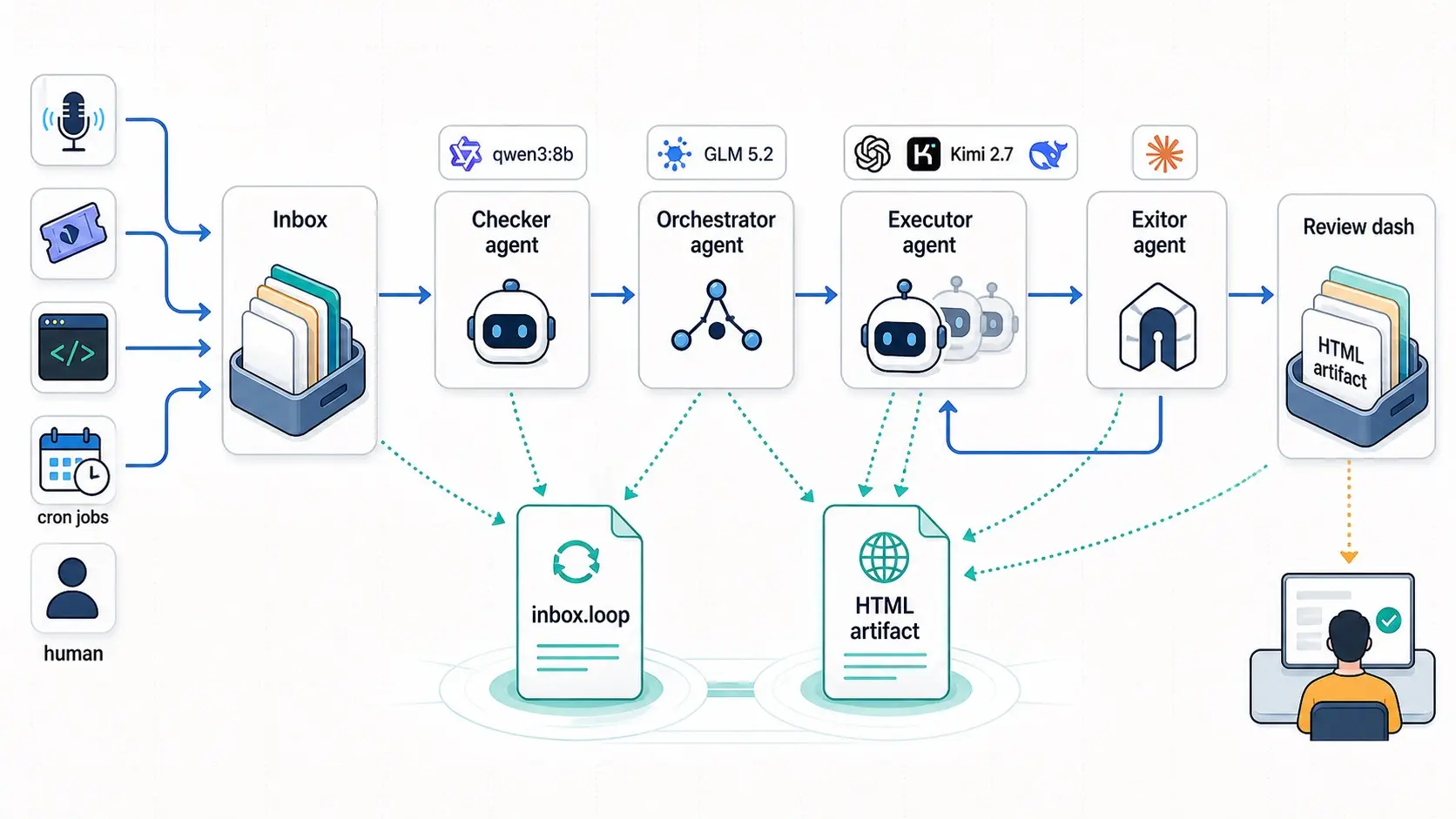
The version I keep sketching starts with an inbox. Where work lands:
something I speak into my phone, a Linear/Jira ticket, a note, a scheduled
cleanup, whatever. It needs to live somewhere durable — not a chat window I’ll
forget by tomorrow. Something closer to a .agents/inbox.loop file with tasks,
follow-ups, reviews, status, and loop policy.
Then the checker. The cheap, recurring process. A glorified cron job. It wakes often and asks boring questions: is there new work? is anything blocked? is review backing up? has a task hit its bounds? Most wakes are file checks. If the checker needs to do anything smarter, keep it bounded and cheap. Power it with a tiny local model — think Qwen3:8B or 16B — effectively free, and you can spin it up as often as you want.
The checker wakes the orchestrator. The smarter agent. The one I want to wake deliberately, not casually. It decides whether to resume context, start fresh, wait on another task, spin off a coding agent, or set up a bounded verifier pass. My rule: if it needs reasoning, it leaves the checker and goes to the orchestrator. Power it with a capable but affordable model — think GLM 5.2. Cheap enough. Plenty capable.
The executor is the actual worker: coding agent, research agent, writing agent, verifier, whatever. This is the part we’re used to handling manually. The difference: something cheaper decides when that expensive worker is worth waking up. And the executor runs with explicit bounds — max turns, max retries, max time, max fan-out, max cost if cost matters. How you power it depends on the task, and partly on the orchestrator’s call. Executors could run on GPT 5.5 X-High, Kimi 2.7 Code, or even Cursor 2.5.
The final piece is the exitor. Nothing publishes, merges, or escapes
automatically (yet2). A loop can prepare a PR, draft, memo, or review, but
anything leaving the sandbox goes through a deterministic wrapper. The exitor
produces a reviewable artifact. I decide. Today I’m fine paying Opus for exit
duties. I want a powerful model here. It can delegate the /artifactor HTML
output to a subagent, but a frontier model makes the decisions.
What is still evolving ##
I’m mostly using files to track .agents/inbox.loop and .agents/review.loop.
Should I use an actual project management tool? I don’t want to go all
beads on this yet.
Building better verification loops is easier said than done. When I get lazy, the review loop blocks the agent so often I end up kicking off tasks manually — the exact thing I built the loop to avoid.
Sandbox and permission handling. Claude Code nailed this with Auto mode. I didn’t realize how important it was when it shipped. Getting opencode — my headless agent of choice — to work auto-mode style hasn’t panned out yet.
Error recovery is still rough. An agent gets stuck because OpenAI, Anthropic, or OpenRouter is down. The checker sees “in progress” but if the session was untracked, I have to go in and unstick it manually. I want a graceful way to route it back through the loop instead of my current approach: throwing everything away and restarting. That’s what I do now.
The budget gate. This is the big one I’m not doing yet. Right now I trust myself not to do anything dumb with spend. At scale, the responsible move is to push a hard gate into the checker: before it wakes the orchestrator, weigh the day’s spend against a ceiling and refuse if the next task would blow past it. Authorize the cost before it happens, not after. That’s the piece that actually earns the word in the title. I’m not there yet.
Model costs. Will GLM 5.7 or 6 run locally at a reasonable price? If so, parts of this system become over-engineered. I don’t think that’s happening yet — RAM prices are still high. But it’s wild west territory.
Still: this is exciting. Once a loop is running, it’s exhilarating to watch work just magically get done.
Comments via 🦋